
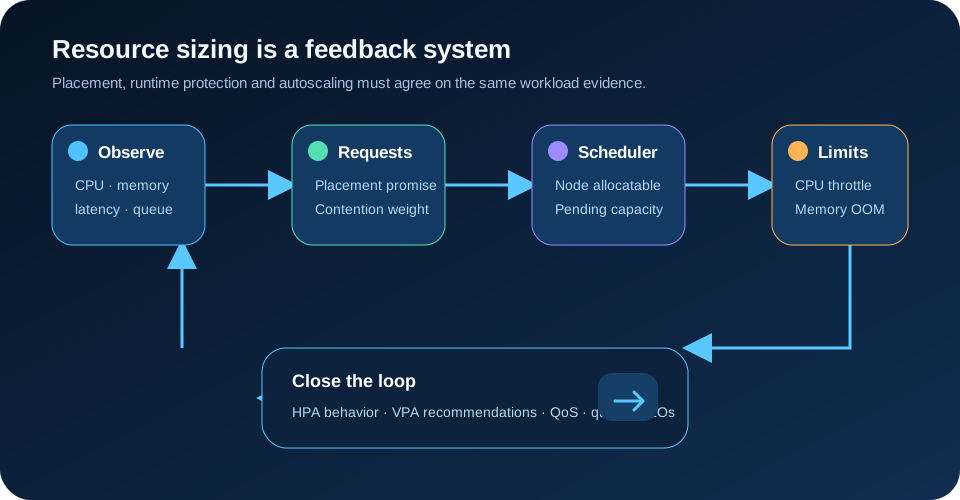
Kubernetes resource requests and limits are a capacity contract, not decorative YAML. Requests tell the scheduler how much CPU and memory a Pod must be able to rely on; limits tell the runtime where to constrain consumption. Bad requests produce poor placement and distorted autoscaling, while bad limits turn load into CPU throttling or OOM kills. The safe production approach is to measure representative workloads, set requests from demand distributions and service objectives, treat CPU and memory limits differently, then close the loop with HPA/VPA recommendations, namespace policy and saturation alerts.
This guide is based on the official Kubernetes documentation reviewed on 5 October 2026. The numeric example is illustrative, not a universal sizing formula. Workload shape, runtime, latency objective, node class and failure policy must determine the real values.
Requests and limits answer different questions
A CPU or memory request answers: what capacity must be available before this Pod can be placed? The kube-scheduler compares the sum of Pod requests with the allocatable capacity of candidate nodes. It does not schedule from today's low utilization. A node can look idle and still reject a Pod because its requested capacity is already committed. That behavior protects the cluster when several workloads reach their peaks together.
A limit answers a runtime question. On Linux, kubelet passes the settings through the container runtime to cgroups. CPU limits are enforced by throttling: the process waits after consuming its allowed CPU time. Memory limits are reactive: when allocation exceeds the cgroup boundary under pressure, the kernel can terminate a process and Kubernetes may report `OOMKilled`. These are not equivalent safety mechanisms.
A container may consume beyond its request while spare capacity exists. The request is therefore not a cap; it is a placement promise and a contention weight. If a limit is provided without a request and no admission policy supplies one, Kubernetes copies the limit into the request. That convenient default can silently reserve far more cluster capacity than intended.
Start from workload distributions, not averages
A daily average hides bursts, cold starts, garbage collection and endpoints with different cost profiles. Collect per-container CPU usage, CPU throttled time, working-set memory, restart reason, latency, throughput and queue depth across normal traffic, peak traffic, deployments and background jobs. Separate application containers from sidecars because their demand and scaling signals differ.
Use a representative window and percentiles, but do not convert one percentile mechanically into a request. For a latency-sensitive API, the CPU request needs enough contention weight to meet its response objective during shared-node pressure. For a batch worker, lower guaranteed CPU may be acceptable if queue age remains within its objective. Memory needs headroom for the runtime's known peaks because a memory miss is not a slower request; it can be a process restart.
Classify the workload before sizing:
- Steady services benefit from stable requests near observed sustained demand plus tested headroom. - Bursty stateless APIs may use lower baseline requests with HPA driven by a meaningful signal, while retaining enough minimum replicas and CPU to absorb the scaling delay. - Memory-heavy runtimes need special attention to heap configuration, native memory, caches and memory-backed volumes. - Jobs should request what one concurrent task needs and limit concurrency at the queue, rather than launching many Pods that all assume the same spare capacity.
Do not size from a single quiet staging run. Replay production-shaped payloads, concurrency and dependencies, then repeat after runtime or library upgrades.
Treat CPU and memory limits differently
CPU is compressible: contention slows work, and a CPU limit enforces a hard time ceiling through throttling. A tight CPU limit can create latency spikes even while the node has unused cores, because the container cannot borrow them beyond its quota. That makes a CPU limit a product decision, not merely a cost control.
For a latency-sensitive service, test whether the platform requires a CPU limit at all. A defensible policy can set a CPU request for placement and contention weight, omit the CPU limit where governance allows, and control total namespace consumption with quotas. If a CPU limit is required, leave measured burst headroom and alert on throttled seconds relative to usage. Never infer that low average CPU means throttling is harmless.
Memory is incompressible. A process cannot become slower to fit an unavailable allocation in the same way. Set the memory request high enough to represent normal committed demand and the limit above observed peaks with headroom justified by the runtime and restart tolerance. Configure the application's heap or cache below the container limit so native allocations and kernel-accounted memory still have space.
Remember that a memory-backed `emptyDir` counts as memory use. Kubernetes warns that an unbounded memory-backed volume can consume the Pod's memory limit, or node memory when no limit exists. Give it a `sizeLimit`, include it in the budget and avoid using tmpfs as an invisible second heap.
Use QoS as an eviction outcome, not a badge
Kubernetes assigns `Guaranteed`, `Burstable` or `BestEffort` QoS from the Pod's requests and limits. During node pressure, this classification influences eviction order: `BestEffort` is considered before `Burstable`, and `Guaranteed` last. It does not mean a Guaranteed Pod can never fail, nor does it replace priority, disruption budgets or application resilience.
A Pod becomes Guaranteed when every container has positive CPU and memory requests and equal corresponding limits. That can be appropriate for tightly controlled critical workloads, but equality also forbids bursting above the reserved values. A Burstable service can reserve a stable baseline and use spare node capacity. BestEffort has no request or limit and is the first choice for eviction; reserve it for genuinely disposable work.
Do not set request equal to an oversized limit merely to obtain the Guaranteed label. The scheduler then reserves unused capacity, increases node count and can leave real work Pending. Choose the service objective first, then accept the resulting QoS class intentionally.
Keep HPA mathematics honest
For CPU utilization targets, HPA calculates utilization relative to the CPU request. A container using `300m` with a `300m` request reports 100% utilization; the same usage with a `600m` request reports 50%. Changing the request can therefore change replica decisions even when traffic and actual CPU do not change.
The official HPA documentation also notes that if relevant containers lack the resource request, utilization is undefined and the autoscaler will not act on that metric. Sidecars can distort a Pod-level average, so use the stable `ContainerResource` metric when scaling should follow the application container rather than logging or proxy sidecars.
An illustrative Deployment and HPA might begin like this:
apiVersion: apps/v1
kind: Deployment
metadata:
  name: catalog-api
spec:
  replicas: 3
  template:
    spec:
      containers:
        - name: api
          image: registry.example/catalog-api:2026-10-05
          resources:
            requests:
              cpu: 300m
              memory: 384Mi
            limits:
              memory: 640Mi
---
apiVersion: autoscaling/v2
kind: HorizontalPodAutoscaler
metadata:
  name: catalog-api
spec:
  minReplicas: 3
  maxReplicas: 20
  scaleTargetRef:
    apiVersion: apps/v1
    kind: Deployment
    name: catalog-api
  metrics:
    - type: ContainerResource
      containerResource:
        name: cpu
        container: api
        target:
          type: Utilization
          averageUtilization: 65
The values are placeholders. Validate them with load tests and observe the full control loop: traffic rises, metrics are sampled, HPA changes desired replicas, new Pods schedule and become Ready, then load redistributes. Minimum replicas and headroom must cover that delay. For queues, requests per second or queue age can be better scaling signals than CPU.
Use VPA first as evidence
Vertical Pod Autoscaler analyzes current and historical CPU and memory use, peaks and OOM events, then exposes target, lower-bound and upper-bound recommendations. It is a separate installation, not a core controller enabled automatically in every cluster. Begin with recommendation-only behavior such as `updateMode: Off` so the team can compare suggested values with service objectives and load tests.
Automatic VPA changes can conflict with HPA when both react to CPU or memory. A changed request alters HPA utilization math, which can change replica count. A practical division is VPA recommendations for requests and HPA on an external or workload metric, or carefully bounded VPA with HPA behavior tested as one system.
Modern Kubernetes can resize container resources in place on supported clusters, but availability does not remove the need for policy and rollback. Check cluster version, runtime support, resize policy, Pending resize conditions and application behavior before relying on in-place changes. Rolling replacement remains the portable baseline.
Guard namespaces with defaults and budgets
A `LimitRange` can inject default requests and limits, enforce minimums and maximums, and constrain request-to-limit ratios inside a namespace. It protects the cluster from missing fields, but generic defaults are not accurate sizing. A tiny default may hide an unsized workload until production; a large default wastes capacity. Use defaults as admission safety and require owners to replace them with measured values.
`ResourceQuota` limits the aggregate requests and limits consumed by a namespace. It establishes a team or environment budget and can force new Pods to specify resources. Quota does not guarantee that all namespaces can reach their maximum simultaneously, and it does not create nodes. Pair it with capacity planning, node autoscaling and a visible budget dashboard.
Keep one deterministic LimitRange per namespace. Kubernetes notes that when multiple LimitRanges exist, which default is applied is not deterministic. Validate manifests in CI and admission policy, and test the final admitted Pod rather than assuming the submitted YAML is unchanged.
Monitor the contract from four angles
One graph cannot diagnose resource sizing. Observe at least four layers:
1. Scheduling: Pending Pods, `FailedScheduling`, requested versus allocatable capacity and node-autoscaler delay. 2. Runtime: CPU use, throttled time, memory working set, OOM kills, restarts and eviction events. 3. Service: latency, error rate, throughput, queue age and deadline misses. 4. Control loops: desired/current replicas, HPA conditions, unavailable replicas and VPA recommendations.
Correlate them by workload revision and container. High latency with CPU throttling suggests a tight limit; high latency without saturation may belong to a dependency or lock. OOM restarts near a deploy can indicate a memory regression, cache warm-up or changed concurrency. Pending replicas during a spike mean HPA asked for capacity the scheduler or node scaler could not supply.
Alert on outcomes, not only percentages: sustained throttling with latency damage, repeated OOMKilled restarts, HPA pinned at maximum, Pending Pods beyond the rollout budget and namespace quota exhaustion. Keep enough history to compare before and after a resource change.
Roll out resource changes as production changes
A request change can reschedule Pods onto different nodes, change cluster-autoscaler demand and alter HPA utilization. A limit change can affect latency or restart behavior. Treat both as deployable changes with review, canary and rollback.
Start with one workload revision or a small canary percentage. Generate steady, burst and dependency-slowdown tests. Compare service objectives, throttling, memory margin, replicas and node cost. Change one dimension at a time; adjusting requests, limits, HPA target and replica bounds together makes the result impossible to explain.
Record why each value exists: observation window, percentile, headroom rule, runtime constraint, owner and review date. Revisit after traffic shape, code, runtime, node type or scaling policy changes. Static YAML should not become permanent folklore.
When not to rely on requests and limits alone
Resource settings cannot fix memory leaks, unbounded queues, expensive queries, lock contention or synchronous downstream calls. They contain some consequences, but the workload still needs backpressure and operational limits. Nor do they guarantee tenant fairness inside one process; enforce tenant budgets in the application and queue.
For highly variable workloads, one Pod shape may be the wrong abstraction. Split latency-sensitive and batch work, separate heavy endpoints, or use specialized node pools. For a single low-risk service on a generously sized cluster, complex autoscaling may add more failure modes than it removes; measured static replicas can be simpler.
The production invariant is clear: every Pod declares an evidence-based placement promise, runtime boundaries match the failure policy, autoscaling reads a meaningful signal, and operators can see when demand exceeds any layer. That turns Kubernetes resource configuration from YAML decoration into an observable capacity system. For related practices, see safe Kubernetes rollouts, user-journey SLOs and OpenTelemetry tail sampling.
Official references
These references document the tools discussed. Examples and design decisions are illustrative and should be adapted to the project and its versions.
Prepared by: Noor Yasser
Working through a similar engineering challenge?
I help teams turn architecture decisions into a clear scope and dependable, reviewable implementation.