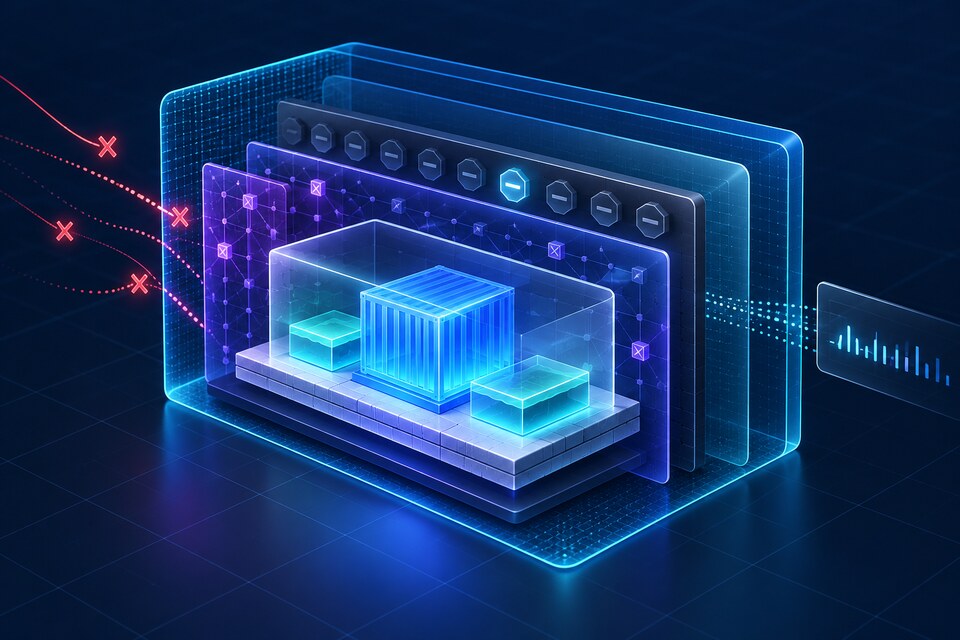
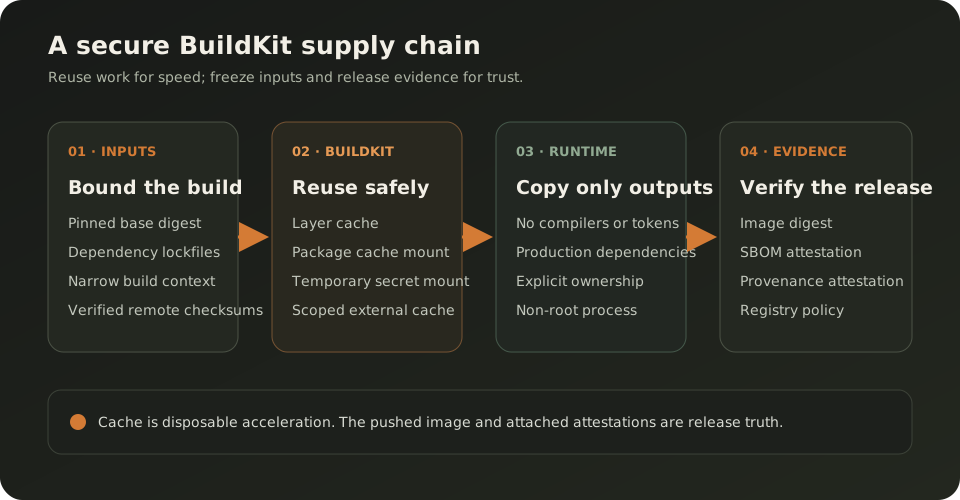
A production Docker build should be fast because it reuses safe work, not because it quietly reuses unknown inputs. The reliable design separates four concerns: immutable or reviewable inputs, disposable BuildKit caches, temporary secret mounts, and a minimal runtime image whose digest is published with SBOM and provenance attestations. That gives CI speed without turning the cache into release truth or embedding credentials in an image layer.
This guide is based on Docker's official BuildKit and Dockerfile documentation, verified on 5 October 2026. Docker documents the mechanisms; the trust boundaries, rollout policy and CI gates below are engineering recommendations. This is a practical explainer, not an announcement of a new Docker release.
Separate the three kinds of reuse
Teams often call everything “the Docker cache,” but BuildKit reuses work through different mechanisms. The regular layer cache can reuse the result of a Dockerfile instruction when its inputs still match. A cache mount gives a package manager a persistent working directory while the RUN instruction still executes. An external cache exports reusable build records to a registry or another supported backend so an ephemeral CI worker can import them later.
Those mechanisms are acceleration, not evidence that an artifact is safe. A cache hit says BuildKit found a matching record under its cache rules. It does not say the base image was recently reviewed, the dependency lockfile is approved, or the resulting image passed the current security policy. Keep the release decision downstream of the build.
The Docker cache optimization guide recommends ordering layers carefully, keeping the context small and using cache mounts for package-manager downloads. Use those tools to avoid repeated network and compilation work. Never make deployment depend on a particular cache entry continuing to exist; a clean builder should still produce a correct image.
Make build inputs reviewable
Start with the base image. Docker tags are mutable: a publisher can move a tag to a newer image. The official build best-practices guide explains that pinning a base by digest selects the same image content, but it also means security fixes do not arrive automatically. Treat the digest as a reviewed dependency and update it through a visible change with rebuild and test evidence.
Apply the same model to application dependencies. Commit the lockfile, use the package manager's frozen or clean-install mode, and fail when the manifest and lockfile disagree. For remote artifacts, prefer a versioned source with a verified checksum; Docker's Dockerfile reference supports checksum validation for remote ADD inputs. A URL that always returns “latest” is not a reproducible input simply because Docker cached it once.
Keep the build context narrow with .dockerignore. Exclude local credentials, development databases, test output, VCS metadata and unrelated assets. A smaller context improves transfer and cache precision, but the security benefit is more important: a file the builder never receives cannot be copied accidentally by a later broad COPY.
Order the Dockerfile around invalidation
Place stable, expensive steps before frequently changing source. For a Node service, copy package.json and the lockfile, install dependencies, then copy the application. If source code is copied before the dependency install, every source edit invalidates the expensive dependency layer even when the dependency graph is unchanged.
This is not a reason to hide real changes from the cache. A dependency step must depend on every file that controls resolution: manifest, lockfile, package-manager configuration and relevant platform arguments. If a build script or generated client changes the installed output, include its controlling input before the step or move generation into its own explicit stage.
Use named stages and make the final production stage the default. Docker's multi-stage build documentation shows how a later stage can copy only selected artifacts from a builder. Named stages survive Dockerfile reordering and let CI target a test or debug stage without shipping it.
Use cache mounts as disposable accelerators
A package cache mount lets npm, pnpm, apt, pip or another tool retain downloaded artifacts between builds without copying that cache into the image. The RUN command still executes and the package manager still validates what it needs. This differs from a cached image layer, where the whole instruction result can be reused.
Choose a cache target specific to the package manager and set a sharing mode that matches its concurrency model. Docker's examples use sharing=locked for package managers that require exclusive access. In multi-tenant CI, do not let untrusted repositories share a writable cache namespace. Scope external cache references by repository and trust level, and consider separate namespaces for protected and untrusted branches.
Never promote the contents of a cache mount into the runtime image. Copy the installed, verified application output from the build stage instead. A cache may be evicted, partially populated or created by an older tool version; correctness must come from the package manager and lockfile, not from the continued existence of cache bytes.
Keep secrets outside layers, metadata and cache keys
Private package registries and source repositories often require credentials during a build. Do not pass them through ARG or ENV and do not COPY a credential file into a stage that is later “deleted.” Docker's build-secrets documentation says ARG and ENV are inappropriate because sensitive values can persist in the final image or its metadata. Use a BuildKit secret mount or SSH mount for the one RUN instruction that needs it.
Secret mounts are temporary. The build client supplies a secret with --secret; the Dockerfile consumes it with RUN --mount=type=secret. The file is available for that instruction and is not baked into the resulting layer. Still assume the command can leak it: do not echo it, place it in a copied artifact, include it in verbose logs, or configure a package manager to write the token into a persistent cache.
There is a subtle cache rule: changing the value of a secret does not itself invalidate a cached RUN. Docker's cache invalidation guide documents that secret IDs and mount properties participate in cache matching, while the secret contents do not. If a non-secret output legitimately depends on credential rotation, change an explicit non-sensitive cache-bust value. Usually the better contract is that credentials authorize access while the lockfile and artifact digest determine content.
Make the runtime stage deliberately boring
The final image should contain the runtime, production dependencies, compiled output and only the files needed to start the process. Leave compilers, package-manager credentials, source maps that expose private code, test tools and build caches in earlier stages unless production operations explicitly require them.
Run the service as a non-root user when it does not require privileges. Set ownership during COPY with --chown rather than adding a large recursive chown layer. Use an explicit working directory, executable command and stable UID/GID when the deployment platform depends on numeric ownership. Docker's best-practices and Dockerfile reference document USER and COPY ownership behavior, but the application must still be tested under the restricted identity.
Smaller is not automatically safer. A minimal image with an unpatched runtime is still vulnerable, and an ultra-minimal image can remove certificates, timezone data or debugging signals the service genuinely needs. Choose the smallest runtime that satisfies an explicit operational contract, then rebuild it regularly against reviewed base-image updates.
Export cache by trust boundary
Ephemeral CI workers lose local BuildKit state, so external cache is valuable. The cache backend documentation supports importing with --cache-from and exporting with --cache-to. A registry cache is convenient because it travels through the same authenticated registry boundary as images, while remaining a separate reference.
Do not have every branch write the same cache reference; Docker warns that writing twice to one location overwrites previous cached data. A practical policy imports the protected main cache plus the current branch cache, then exports only to the current branch's scoped reference. When the branch is merged, a protected workflow refreshes main.
Treat cache write permission as more sensitive than cache read permission. Untrusted pull requests should not publish into the cache namespace later consumed by production builds. Even when BuildKit validates records, separation makes provenance and incident analysis clearer and prevents a low-trust job from controlling shared acceleration state.
Attach evidence to the pushed image
BuildKit can create SBOM and provenance attestations. Docker's attestation documentation says an SBOM lists software artifacts, while provenance records how the image was built. These attestations attach to the image index and can be inspected from a registry without pulling the whole image.
Generate attestations for the artifact you push, not only for a local test build. The registry image digest, SBOM and provenance should travel through promotion together. A deployment policy can then require an allowed builder identity, reviewed source revision, expected repository and acceptable dependency findings before admitting the digest.
Attestations are evidence, not a verdict. An SBOM can be incomplete for some ecosystems, and provenance does not prove the source is correct. Pair them with dependency scanning, signature or identity policy, tests and runtime controls. Also verify builder support: Docker notes that attestations require an image-store and exporter path that preserves image indexes; --push retains them, while a classic local image store may not.
A production-oriented Dockerfile
The following pattern separates dependency resolution, compilation, production dependencies and runtime. Replace the placeholder digest with a reviewed digest and adapt paths to the application. The npm secret mount is only needed for a private registry.
# syntax=docker/dockerfile:1
ARG NODE_IMAGE=node:24-alpine@sha256:<reviewed-digest>

FROM ${NODE_IMAGE} AS dependencies
WORKDIR /app
COPY package.json package-lock.json ./
RUN --mount=type=cache,target=/root/.npm,sharing=locked \
    --mount=type=secret,id=npmrc,target=/root/.npmrc \
    npm ci

FROM dependencies AS build
COPY . .
RUN npm test && npm run build

FROM ${NODE_IMAGE} AS production-dependencies
WORKDIR /app
COPY package.json package-lock.json ./
RUN --mount=type=cache,target=/root/.npm,sharing=locked \
    --mount=type=secret,id=npmrc,target=/root/.npmrc \
    npm ci --omit=dev

FROM ${NODE_IMAGE} AS runtime
ENV NODE_ENV=production
WORKDIR /app
COPY --from=production-dependencies --chown=node:node /app/node_modules ./node_modules
COPY --from=build --chown=node:node /app/dist ./dist
COPY --chown=node:node package.json ./package.json
USER node
CMD ["node", "dist/main.js"]
Do not copy this blindly. Some frameworks need generated assets, native libraries, CA bundles or a process init. Confirm that production dependencies contain required native binaries for every target architecture. If a postinstall script compiles native modules, the build and runtime libc and architecture must be compatible.
Turn the CI build into a contract
First run Docker's static build checks. The build-check documentation supports docker build --check and can promote warnings to errors. This catches issues such as secrets declared through suspicious ARG or ENV keys, invalid stage names and Dockerfile mistakes before spending the full build budget.
Then build, test and push by immutable revision. Import caches from the current branch and protected main, export to the branch scope, mount secrets from the CI secret store, and request attestations. A representative command is:
docker build --check .

docker buildx build \
  --secret id=npmrc,src="$NPMRC_PATH" \
  --cache-from type=registry,ref=registry.example.com/app:cache-main \
  --cache-from type=registry,ref=registry.example.com/app:cache-$BRANCH_SLUG \
  --cache-to type=registry,ref=registry.example.com/app:cache-$BRANCH_SLUG,mode=max \
  --platform linux/amd64,linux/arm64 \
  --sbom=true --provenance=mode=max \
  --tag registry.example.com/app:$GIT_SHA \
  --push .
After push, record the resolved digest, verify both platform manifests and inspect the attached attestations. Deploy by digest, not a mutable release tag. Run the container as its final user with a read-only filesystem where the application supports it, exercise its health and shutdown paths, and scan the exact pushed digest rather than a locally rebuilt look-alike.
Schedule clean rebuilds with fresh reviewed inputs. A warm-cache build proves the fast path; a periodic clean build proves the Dockerfile is complete. If the clean build fails, the cache has been masking an undeclared dependency.
Know when not to optimize cache hits
Do not preserve a dependency layer when the goal is to discover patched packages. A security refresh should update the pinned base or dependency inputs and intentionally invalidate the affected steps. --no-cache forces instruction execution but does not automatically pull a newer base; Docker documents --pull and --no-cache as separate controls.
Avoid a shared external cache for untrusted, unrelated repositories. Avoid secret-dependent generated artifacts unless they have a precise non-secret identity and can be verified independently. Do not use multi-platform emulation as proof that native runtime behavior is correct; test important architecture-specific code on native runners or representative environments.
For a tiny service built infrequently, a complex remote-cache topology may cost more operational effort than it saves. Begin with good layer ordering, a narrow context and multi-stage output. Add cache mounts when package downloads dominate. Add external cache when CI workers are ephemeral and build time is materially important.
Production decision
The safe optimization target is not “maximum cache hits.” It is “minimum repeated work while every release remains explainable.” Pin or review inputs, let caches be disposable, mount secrets only for the instruction that needs them, copy only runtime artifacts into the final stage, and push the image with SBOM and provenance.
This design works especially well for CI/CD pipelines that build frequently, use private dependencies or target multiple architectures. It is unnecessary ceremony for a throwaway local prototype, but the secret boundary and minimal runtime stage still matter. For the operational side, connect it to cloud and delivery engineering, Kubernetes resource sizing and safe rollout contracts.
Official references
These references document the tools discussed. Examples and design decisions are illustrative and should be adapted to the project and its versions.
Prepared by: Noor Yasser
Working through a similar engineering challenge?
I help teams turn architecture decisions into a clear scope and dependable, reviewable implementation.