Docker released Docker Desktop 4.97.0 on October 26, 2026 with a fix for CVE-2026-114409. Before 4.97.0, insufficient redaction of IPC payloads could write third-party API keys and OAuth access tokens in clear text to local Docker Desktop application logs and diagnostic bundles. Anyone who could read those files could recover the exposed credentials. Docker explicitly says the affected OAuth tokens are not Docker account tokens.
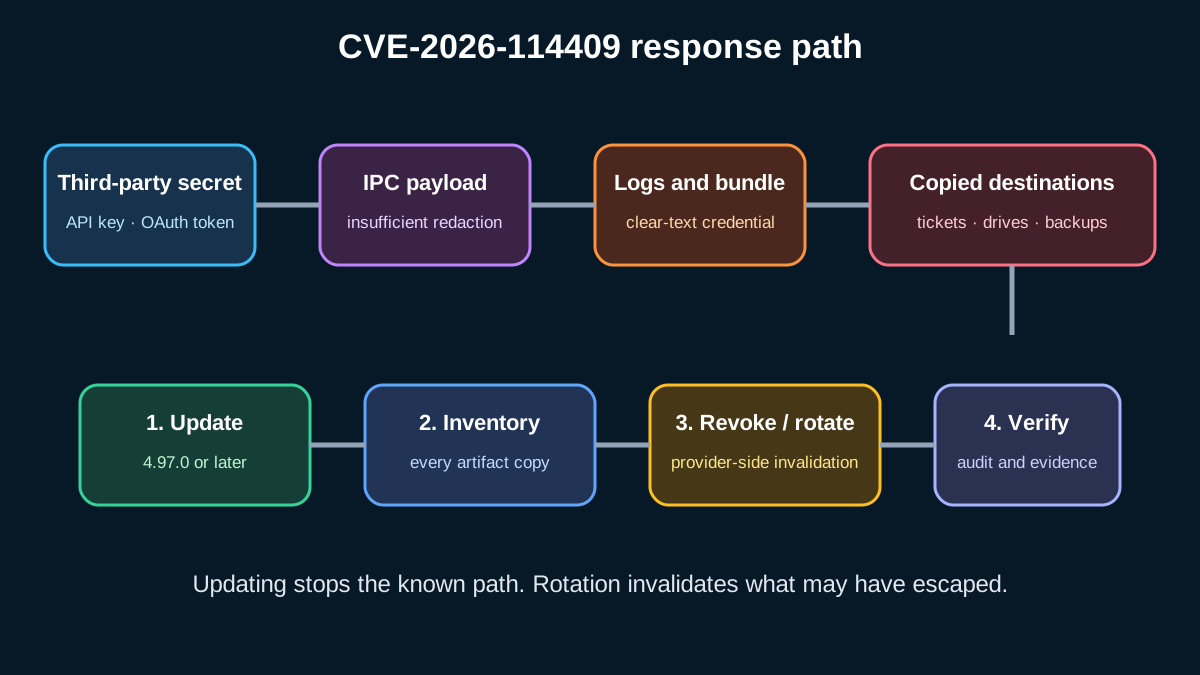
The correct response is larger than “install the update.” Version 4.97.0 fixes the logging path and cleans existing host logs and crash dumps, but it cannot retract diagnostic bundles already uploaded to a support system, copied to a shared drive, attached to a ticket, archived by endpoint tooling or retained in backups. Treat the update as containment, then locate every copy, determine which providers and identities may be represented, revoke or rotate the affected credentials, and verify both the workstation and the downstream systems.
The affected-version boundary and cleanup behavior below are Docker facts. The inventory model, decision table, incident workflow and rollout gates are engineering recommendations. Docker's public notice does not state that a specific organization was compromised, so this guide does not convert possible credential exposure into a breach claim.
What CVE-2026-114409 changes
Docker's security announcement says Docker Desktop versions before 4.97.0 were affected. Releases 4.94.0 and 4.95.0 addressed the known logging paths, but credentials already written could remain in local logs. Docker Desktop 4.97.0 completes the fix and includes cleanup of existing host logs and crash dumps.
The exposure path has four parts:
- a third-party integration sends an API key or OAuth access token through an IPC payload;
- Docker Desktop logs or diagnostic collection records the payload without sufficient redaction;
- the file remains on the endpoint or enters a diagnostic bundle;
- a person, service account, support platform, backup agent or attacker with read access can obtain the secret.
The vulnerability does not require the secret to appear in a container's application log. It concerns Docker Desktop's own local application logs and diagnostics. That distinction matters when scoping the search: checking only container stdout and stderr is incomplete.
Decide the response from evidence, not the version alone
| Observed condition | Minimum action | Why |
|---|---|---|
| 4.97.0 or later, no earlier installation or migrated logs | Verify version and cleanup; monitor | Current fix is present, but asset history still matters |
| Earlier than 4.97.0, no diagnostics shared | Update, inventory local artifacts, rotate any discovered credential | A local reader may have accessed the logs |
| Diagnostic bundle was uploaded or attached to a ticket | Update, identify recipients and retention, revoke or rotate represented credentials, remove or sanitize copies | The artifact crossed the endpoint boundary |
| Logs were collected by EDR, SIEM, backup or file sync | Update and search every downstream store; restrict access and rotate affected credentials | Central collection expands the reader set and retention |
| Evidence of token use from an unknown source | Revoke first, contain the identity, preserve evidence and start incident response | This is evidence of misuse, not merely exposure potential |
Do not mark a machine safe only because its current version is 4.97.0. You need the installation history, the existence of older artifacts, and the movement of diagnostic bundles.
Build an exposure inventory
Create one record per endpoint and artifact. The goal is to connect an affected Docker Desktop installation to the secret provider, the file's destinations and the actions already taken.
{
  "device_id": "dev-mac-042",
  "docker_desktop_version_before": "4.96.1",
  "docker_desktop_version_now": "4.97.0",
  "diagnostics_generated": true,
  "artifact_destinations": ["support-ticket-1842", "endpoint-backup"],
  "credential_providers": ["source-control", "cloud-api"],
  "exposed_secret_values_stored": false,
  "rotation_status": "in_progress",
  "owner": "platform-security",
  "evidence_ref": "IR-2026-311"
}
Never copy the secret value into this record. Store a provider, credential identifier or a one-way fingerprint only when that is safe and approved. The incident tracker must not become a new secret repository.
Inventory at least:
- Docker Desktop version history and update timestamp;
- whether diagnostics were generated, uploaded or manually copied;
- local logs, crash dumps and diagnostic archives created before remediation;
- support tickets, email attachments and chat uploads;
- shared folders, cloud drives, backup snapshots, EDR collections and SIEM ingestion;
- people and service accounts allowed to read each destination;
- providers whose API keys or OAuth access tokens could have passed through Docker Desktop;
- audit events from those providers around the possible exposure window.
If a support or storage platform has immutable retention, record that limitation. Deleting the visible ticket attachment may not remove replicas, backups or legal-hold copies.
Update safely across the fleet
Use your normal managed deployment channel to install Docker Desktop 4.97.0 or later. Pilot on representative Windows and macOS devices, including teams that use proxies, extensions, Kubernetes, alternate data roots or enterprise settings. Verify the installed version from a trustworthy inventory source rather than relying only on a successful package-manager job.
Deployment gates should prove:
- Docker Desktop starts and reports 4.97.0 or later;
- required containers and Compose projects still run;
- corporate sign-in and required integrations still work;
- the endpoint no longer creates newly affected log material under the tested flow;
- old host logs and crash dumps covered by Docker's cleanup are gone or sanitized;
- externally copied artifacts are tracked separately because the installer cannot clean them.
Do not run a blind recursive secret scan that prints matches into CI logs. Use an approved endpoint or data-loss-prevention workflow that reports file identifiers and secret types while suppressing values. Limit access to the results.
Revoke and rotate by provider
When a credential may have been present in an affected artifact, prefer revocation followed by replacement over merely changing the local file. OAuth access tokens may also have refresh tokens, sessions or delegated grants governed by their provider. Follow that provider's revocation model and confirm that the old credential fails.
For each credential:
- identify its provider, owner, scope and workloads;
- determine whether immediate revocation will stop production;
- create a replacement with the minimum required scope and expiry;
- deploy it through the approved secret manager;
- verify the dependent workload;
- revoke the old credential and terminate related sessions where supported;
- review provider audit logs for use outside expected devices, locations and times;
- record evidence without recording the secret.
If the token protects write access, infrastructure administration, source control, cloud resources or customer data, use a faster response tier. Read-only credentials still matter: source code, logs and metadata can contain additional secrets and operational intelligence.
Handle diagnostic artifacts as sensitive data
Diagnostic bundles should have an owner, a case reference, a retention deadline and an explicit recipient list. Upload only through the approved support channel. Before sharing, use the product's current collection path and an approved sanitization step; do not improvise by opening archives on an untrusted device.
For existing copies:
- remove or sanitize the attachment in the ticket system where possible;
- ask the receiving support organization to confirm deletion under its retention process;
- remove copies from shared drives and chat systems;
- expire public or organization-wide links;
- record backups and immutable replicas that cannot be immediately deleted;
- restrict access until retention expires;
- rotate represented credentials even when deletion is confirmed, because prior reads cannot be undone.
Deletion is not proof that the secret was never read. Rotation is the control that invalidates the credential.
Detection and investigation
Start with the provider's audit trail, not a grep result alone. Look for token use from new IP ranges, devices, user agents, repositories, organizations or cloud regions; unexpected OAuth grant changes; new keys or sessions; privileged API operations; source-code downloads; and activity after the user's normal working hours.
Separate three conclusions:
- vulnerable: an affected version was installed;
- exposed: a credential appeared in a log or bundle, or the artifact left the device;
- compromised: evidence shows unauthorized use or control.
Do not call every vulnerable endpoint compromised. Conversely, do not close the case because there are no Docker errors: a valid credential can be used through the third-party provider without touching Docker again.
If misuse is found, preserve relevant endpoint, identity-provider and service audit evidence before broad cleanup. Contain the account, revoke credentials, review persistence and downstream changes, and follow the organization's incident-response plan.
Best practices
- Enforce a minimum Docker Desktop version through device management.
- Keep third-party credentials in OS-backed or enterprise secret stores.
- Use short-lived, narrowly scoped tokens where the provider supports them.
- Treat diagnostic bundles as secrets-bearing artifacts by default.
- Upload diagnostics only to named cases with limited readers and expiry.
- Inventory copies across ticketing, chat, drives, backups, EDR and SIEM.
- Rotate credentials after possible disclosure; deletion alone is insufficient.
- Verify old credentials fail and replacement workloads succeed.
- Monitor provider audit logs during and after rotation.
- Keep incident evidence free of raw secrets.
Anti-patterns
- Updating to 4.97.0 and declaring the incident closed.
- Searching only container logs and ignoring Docker Desktop application logs.
- Posting diagnostic archives in a public issue or broad chat channel.
- Copying discovered token values into a spreadsheet or ticket.
- Deleting a bundle while leaving the credential valid.
- Rotating a token without checking refresh grants or related sessions.
- Assuming Docker account credentials are the affected tokens despite Docker's clarification.
- Treating a vulnerability as a confirmed breach without evidence.
- Running secret scanners that echo matches into another log system.
- Forgetting backups and immutable retention copies.
Limitations
Docker's notice defines the affected versions, cause, data types and local cleanup behavior, but it does not enumerate every third-party provider, log location, enterprise collection agent or retention path. It also does not state that exploitation occurred in a specific environment. The exact investigation and revocation steps therefore depend on operating system, device management, support workflow, token provider and legal retention requirements.
Version compliance is necessary but not sufficient. The durable control is an artifact lifecycle that assumes diagnostics can contain sensitive data, minimizes token scope and lifetime, records where bundles travel, and can revoke access quickly.
Executive takeaway
CVE-2026-114409 is a credential-exposure problem with a long tail. Install Docker Desktop 4.97.0 or later to stop the known logging path and clean covered host artifacts. Then find diagnostic bundles and copied logs, map them to providers and readers, revoke or rotate affected credentials, check provider audit trails, and prove that both the old credentials and the unsafe artifacts are no longer usable. Update, rotate, verify and retain evidence as four separate gates.
Continue with the Cloud, DevOps and Kubernetes hub, software, AI and cloud engineering services, Docker runtime hardening guide, secure BuildKit caching guide and Node.js October 2026 security response.
Primary references
- Docker — Security announcements: CVE-2026-114409
- Docker Desktop 4.97.0 release notes — October 26, 2026
- Docker — Troubleshoot Docker Desktop
- Docker Desktop CLI — logs
- Docker — Platform FAQ: authentication information
- Wikimedia Commons — Sun Modular Datacenter
- Creative Commons Attribution-ShareAlike 3.0
Prepared by: Noor Yasser
Official references
These references document the tools discussed. Examples and design decisions are illustrative and should be adapted to the project and its versions.
Prepared by: Noor Yasser
Working through a similar engineering challenge?
I help teams turn architecture decisions into a clear scope and dependable, reviewable implementation.