OpenAI released GPT-Image 2.6 Sunburst and Flare on November 4, 2026. The important engineering change is not simply “better pictures”: the Image API now exposes two production choices, a separate complexity control, markup-guided editing, raster and transparent output, plus generation paths for SVG and animated GIF. Teams that publish product, campaign, documentation or interface assets should treat those capabilities as an asset pipeline with contracts and review gates—not as a prompt box.
Answer first
Use Flare when iteration speed is the leading constraint and Sunburst when detail, layout or edit precision determines whether an asset is usable. Keep complexity separate from quality: complexity controls planning before rendering, while quality controls visual detail. Route every output through format validation, visual and text checks, rights review, versioned metadata and human approval where mistakes can reach customers. SVG and GIF require format-specific handling; neither should bypass the same provenance and publication controls used for raster assets.
Search intent: choose and operate GPT-Image 2.6 safely in a production asset workflow. Primary keyword: GPT-Image 2.6 production pipeline. Related entities and terms include OpenAI Image API, Sunburst, Flare, image generation, image editing, complexity, quality, markup overlay, SVG, animated GIF, transparent background, visual QA, asset provenance and rollback.
What OpenAI actually released
The official OpenAI API changelog records the November 4 release of gpt-image-2.6-sunburst and gpt-image-2.6-flare for image generation and editing. It also lists adjustable complexity, SVG generation, animated GIF generation and markup-guided editing for supported GPT-Image 2.5 and 2.6 models.
OpenAI's image generation guide describes Sunburst as the option for detailed visual work and Flare as the option for fast iteration. The prompting guide makes the routing advice more explicit: test Flare first when response time matters most; test Sunburst when detail, layout or edit accuracy is the acceptance boundary.
Those are vendor-documented capabilities and recommendations. They do not establish that either model will satisfy a specific brand, legal, accessibility or factual requirement. That is an engineering question that must be answered with your own evaluation set.
Separate model, complexity and quality
Treat the three controls as different decisions:
| Control | Documented meaning | Production question |
|---|---|---|
model | Flare prioritizes fast iteration; Sunburst targets detailed work and precise edits | Which failure costs more: waiting or rejecting an unusable asset? |
complexity | Low, medium or high planning before rendering; omitted means high | How much scene, text and object relationship must be reasoned through? |
quality | Rendering detail; supports auto through higher quality levels | What detail survives the final delivery size and compression? |
size | Auto or supported pixel dimensions | Which channel template and crop are required? |
background | Auto, opaque or transparent | Does the downstream renderer preserve a real alpha channel? |
output_format | PNG, JPEG or WebP; generations also support SVG and GIF | Which validator and publishing path owns this file? |
Higher complexity can increase latency and may introduce unwanted changes. OpenAI also says complexity has no separate fee, but that does not mean it has no operational cost: extra latency, review time and rejection rates still matter. Build a prompt-and-asset evaluation matrix rather than setting every request to high by default.
Define the acceptance contract before the prompt
A prompt is only one input. Start each job with a machine-readable contract:
{
  "job_id": "asset_01...",
  "purpose": "product-landing-hero",
  "model_route": "flare-first",
  "output": {
    "format": "webp",
    "size": "1536x1024",
    "background": "opaque"
  },
  "must_preserve": ["product geometry", "approved logo", "brand palette"],
  "must_not_contain": ["unapproved claims", "watermarks", "extra logos"],
  "checks": ["mime", "dimensions", "text", "brand", "rights", "human-review"],
  "fallback": "approved-stock-asset-v3"
}
This contract is an engineering recommendation, not an OpenAI feature. It makes routing and review reproducible. Store the prompt, model identifier, parameters, input hashes, response identifier, decoded output hash, evaluator results and reviewer decision. Do not rely on a filename such as final-v7.webp as provenance.
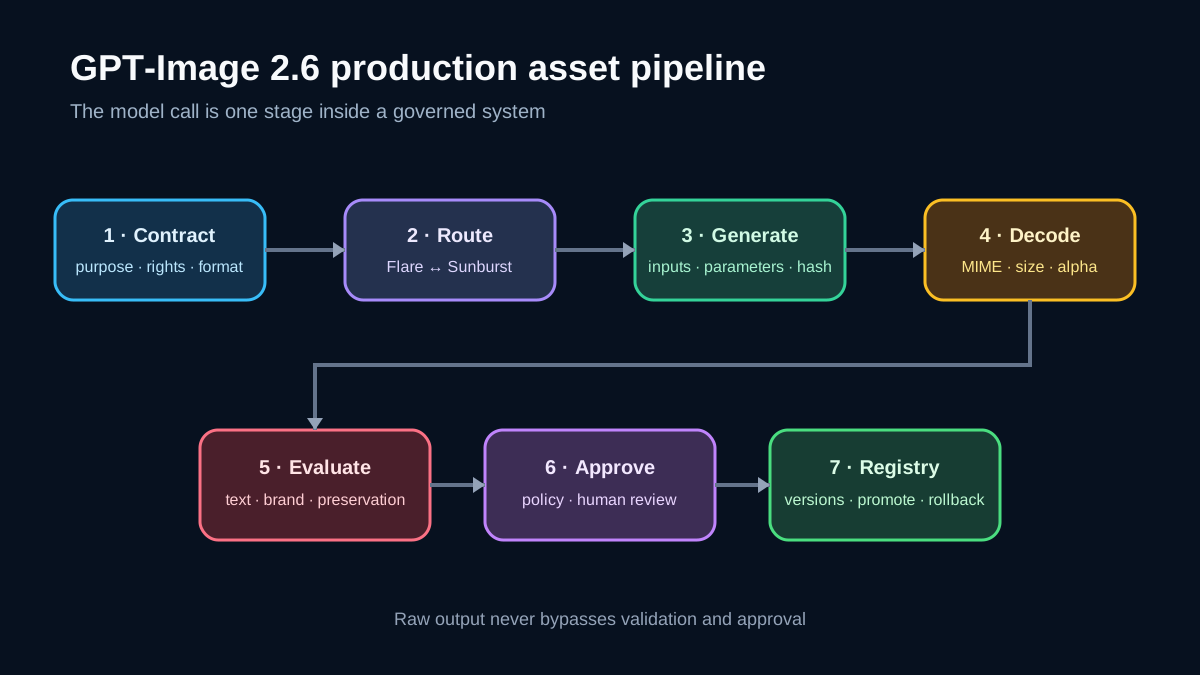
A production pipeline
Use seven stages:
- Admit the request. Authenticate the caller, validate the intended channel and reject missing rights or approval context.
- Resolve the route. Choose Flare or Sunburst and the initial complexity/quality pair from policy, not from free-form user text.
- Prepare inputs. Normalize orientation, color profile and alpha behavior. Hash every reference image and record its license or ownership basis.
- Generate or edit. Send an idempotent job record to the Image API. A retry must not create an untracked second candidate.
- Decode and inspect. Verify MIME type, dimensions, file signature, alpha channel, SVG structure or GIF animation properties before displaying the result.
- Evaluate. Run visual similarity or preservation checks, OCR and text review, brand rules, policy checks and human review where required.
- Publish derivatives. Create WebP/JPEG/PNG derivatives, attach immutable metadata and promote an approved asset through staging to production.
Keep the original response artifact read-only. Derivatives should point back to it. If a reviewer rejects an output, record a reason code such as text_error, identity_drift, brand_mismatch, layout_failure or rights_unknown; otherwise teams cannot learn which route works.
Model routing without guesswork
Create a small representative evaluation set from real asset classes:
- simple background or color edits;
- transparent product cutouts;
- campaign layouts with exact text;
- diagrams with labels and relationships;
- localized variants that must preserve composition;
- multi-reference composites;
- looping motion assets.
Run the same acceptance contract through Flare and Sunburst at the relevant complexity levels. Measure task-specific pass rate, end-to-end latency, retry count and reviewer time. Do not publish a single benchmark number detached from the task mix.
A practical router can start with Flare for low-risk drafts and escalate to Sunburst when:
- the first candidate fails detail, layout or preservation checks;
- a regulated or high-value asset requires the stricter route by policy;
- a localized edit must retain the original geometry;
- the task contains dense labels or object relationships.
Escalation is not proof that Sunburst will succeed. It is a controlled second route with its own acceptance gate.
Markup-guided editing
OpenAI documents markup as a transparent PNG overlay matching the first input image's pixel dimensions. The markup applies only to that first input; additional images are references. When using markup, omit the mask.
That interface is useful for local edits, but the overlay is not an authorization boundary. The model can still change pixels outside the marked region. Compute a change map between the input and result, apply a tolerance policy outside the target region and require human review for identity, product, medical, legal or evidentiary images.
Store three hashes together: source image, markup overlay and final output. Without all three, a later reviewer cannot reconstruct what the edit request targeted.
SVG is code-adjacent output
The image generation guide says SVG generation returns UTF-8 XML bytes decoded from base64. OpenAI says the returned document contains static vector content without scripts, external resources or embedded raster images. The edit endpoint does not accept SVG as a raster input and does not produce SVG edits.
Even with those documented restrictions, treat SVG as untrusted structured content:
- parse it with a hardened XML parser;
- enforce an element and attribute allowlist;
- reject scripts, event handlers, foreign objects, external URLs and data URLs;
- cap node count, path complexity and decoded size;
- rasterize it in an isolated worker for previews;
- serve it with the intended content type and a restrictive Content Security Policy;
- keep the original hash and sanitized derivative hash.
Do not “clean” an SVG with regular expressions. XML parsing and explicit policy are required.
GIF needs a different budget
OpenAI documents output_format: "gif" for generation and editing. The API reference notes that GIF output does not support streaming, partial images, masks or custom output compression. A generated loop can be much heavier than a static asset and can affect accessibility.
Before publication, check frame count, duration, dimensions, decoded memory and file size. Create a static poster, honor reduced-motion preferences where the product surface supports them, and reject flashing or rapid transitions. Store the approved animation and poster as a linked pair.
Raster and transparency checks
For transparent assets, the prompting guide recommends PNG or WebP and explicitly says to inspect the decoded alpha channel; a drawn checkerboard is not transparency. Enforce that rule automatically. Also verify:
- the decoded format matches the declared MIME type;
- width and height match the contract;
- a transparent deliverable contains meaningful alpha values;
- JPEG does not silently enter a transparency-required route;
- compression does not make small text or product labels unusable;
- color profile handling is consistent across derivative workers.
A successful API response is not an accepted asset.
Decision table
| Need | Start with | Output path | Mandatory checks |
|---|---|---|---|
| Rapid concept iteration | Flare | Raster draft | dimensions, obvious text errors, policy |
| Detailed campaign composition | Sunburst | Raster master | layout, exact text, brand, human approval |
| Localized edit of an approved visual | Sunburst or evaluated route | Raster edit | preservation map, OCR, locale review |
| Transparent product cutout | Evaluated model | PNG/WebP | real alpha, silhouette, label preservation |
| Scalable generated illustration | Evaluated model | SVG generation | XML allowlist, isolated raster preview |
| Short looping motion | Evaluated model | GIF | frames, duration, size, reduced-motion fallback |
| High-risk factual or evidentiary image | Do not auto-publish | Controlled review | source verification and explicit approval |
Example architecture
A commerce team can separate responsibilities into five services:
- asset request API: owns authentication, purpose and approval scope;
- policy router: selects model, parameters and fallback;
- generation worker: calls the OpenAI endpoint and stores the raw response;
- asset validator: performs format, preservation, OCR, brand and safety checks;
- asset registry: versions originals, derivatives, rights metadata and promotion state.
The storefront or CMS reads only assets in an approved state. It never calls the model directly. A rollback changes the promoted asset pointer; it does not regenerate under incident pressure.
Best practices
- Pin explicit model identifiers and record every request parameter.
- Use a representative evaluation set before changing a route.
- Keep complexity and quality as separate policy decisions.
- Hash source images, markup overlays, outputs and derivatives.
- Validate decoded files, not only HTTP metadata.
- Preserve exact-text requirements in a separate field and verify with OCR plus human review.
- Store rights and consent metadata for every input.
- Provide a deterministic fallback for publication deadlines.
- Limit retries and classify rejection reasons.
- Put human approval before high-reach or high-risk publication.
Anti-patterns
- Sending every request to Sunburst at high complexity without measurement.
- Treating a successful response as publishable.
- Assuming markup prevents changes outside the marked region.
- Serving generated SVG directly without structured validation.
- Publishing GIF without motion and size controls.
- Using generated imagery as evidence of a real event or product condition.
- Mixing licensed references with unknown web images.
- Overwriting the approved asset when testing a new model.
- Logging signed URLs, private inputs or credentials with prompts.
- Claiming vendor examples prove your own workload quality.
Limits and uncertainties
OpenAI's documentation describes available controls and model positioning, but it does not guarantee exact text, identity preservation, historical accuracy, brand compliance or deterministic output. Generation is probabilistic. Rate limits depend on the organization, and pricing or supported parameters can change; check current model and pricing pages when estimating cost.
The visual examples and benchmark-like comparisons in vendor documentation are demonstrations selected by the vendor. Treat them as product evidence, not independent validation. Your acceptance tests must use rights-cleared inputs from your real workload.
Executive checklist
- Route Flare for speed and Sunburst for detail only after task-specific evaluation.
- Define format, dimensions, preservation rules and forbidden content before generation.
- Record model, complexity, quality, inputs and hashes.
- Validate raster, SVG and GIF with format-specific controls.
- Check text, layout, brand, rights and preserved regions.
- Require human approval for high-risk or public-facing assets.
- Publish immutable derivatives through an asset registry with rollback.
For related controls, see OpenAI Model Spec: turn autonomy into an action contract, Secure RAG ingestion: quarantine documents before retrieval, and GPT-6.1 Terra: guarded computer use. Browse the AI and engineering topics hub.
References
- OpenAI API changelog — GPT-Image 2.6 release
- OpenAI — Image generation guide
- OpenAI — GPT-Image 2.6 prompting guide
- OpenAI — GPT-Image 2.6 Sunburst model
- OpenAI — GPT-Image 2.6 Flare model
- OpenAI API reference — Create image
- Spnq — Minimalistic workspace with tablet, CC0 1.0, Wikimedia Commons
Prepared by: Noor Yasser
Official references
These references document the tools discussed. Examples and design decisions are illustrative and should be adapted to the project and its versions.
Prepared by: Noor Yasser
Working through a similar engineering challenge?
I help teams turn architecture decisions into a clear scope and dependable, reviewable implementation.