GPT-6.1 Terra is OpenAI's new efficiency-focused model for visual reasoning, computer use and clear writing. It matters to teams that need to inspect screens, compare images or operate software at high volume, but the safe production pattern is not “give the model a browser and trust the result.” Route only suitable tasks to Terra, run every action inside an isolated environment, validate each proposed action against policy, require approval for consequential steps, and verify the resulting state before declaring success.
This article covers the release announced on October 26, 2026 and the API documentation verified on October 27, 2026. Model specifications and prices are documented facts. Benchmark and factuality figures are OpenAI's reported evaluations, not independent guarantees. The guarded execution architecture below is engineering analysis.
The answer first
Use GPT-6.1 Terra for bounded visual and computer-based work where speed and unit cost matter: extracting facts from invoices, matching product images, checking a dashboard, drafting from visual material, or executing a short workflow in a controlled application. Keep GPT-6.1 Sol or Astra for the hardest coding and long-horizon reasoning, and Luna for narrow repeatable decisions where visual or desktop interaction is unnecessary.
Before an action reaches the browser or desktop, enforce four gates:
- authorize the requested business objective;
- constrain the environment, accounts, domains and available actions;
- pause for human approval before irreversible or high-impact actions;
- read back the final state from an authoritative source.
The model proposes. Your application decides, executes and proves.
What OpenAI actually released
OpenAI added gpt-6.1-terra to the Responses API and Chat Completions on October 26. The model page describes a 1,050,000-token context window, up to 128,000 output tokens, a June 1, 2026 knowledge cutoff and reasoning efforts from none through max. Tool calling requires the Responses API.
OpenAI's standard short-context pricing lists $1 per million input tokens, $5 per million output tokens and $0.05 per million cached input tokens. These prices are current documentation values, not a lifetime guarantee; regional processing, service tiers and long-context pricing can change the effective cost.
OpenAI reports that Terra is 50% cheaper at standard API prices than GPT-5.6 Terra and GPT-6.1 Sol. The launch post also reports higher scores on its visual and computer-use evaluations and lower internal factual error rates than GPT-5.6 Terra. Those results justify evaluation, not automatic migration. The system-card addendum explicitly warns that research or API evaluation conditions may differ from production ChatGPT because prompts, tools and reasoning settings vary.
Choose Terra by workflow, not model rank
| Workload | Default route | Why |
|---|---|---|
| Invoice image to structured draft | Terra, medium effort | visual extraction plus bounded writing |
| Product-photo catalog matching | Terra with confidence threshold | visual comparison at volume |
| Short browser data-entry workflow | Terra in an isolated session | computer use with explicit action policy |
| Complex repository-wide refactor | Sol or Astra | deeper coding and long-horizon planning |
| Fixed classification at very high volume | Luna or deterministic rules | less capability and cost are sufficient |
| Money transfer, account deletion or final submission | Human-led workflow | consequence exceeds autonomous authority |
Do not route by prompt length alone. Record the input modality, action risk, required accuracy, expected steps and acceptable latency. A model that is cheaper per token can still be more expensive per completed task if it retries, produces long traces or needs frequent human recovery.
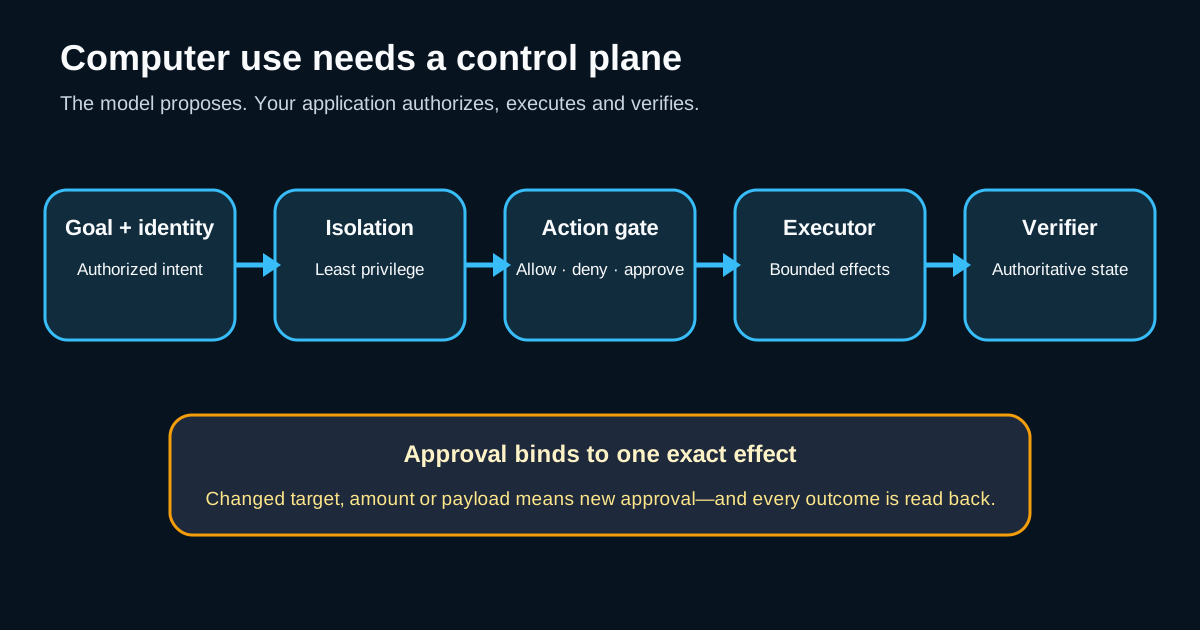
Build a guarded computer-use loop
A production loop has distinct control planes:
user goal
  -> policy and identity check
  -> isolated browser or desktop session
  -> model proposes actions
  -> action validator allows, denies or requests approval
  -> executor performs one bounded batch
  -> screenshot plus structured state returned
  -> independent completion verifier
  -> audit record and result
The model must never receive raw infrastructure credentials or a general-purpose operating-system session. Give it a short-lived browser profile, the minimum account role and a network allowlist. Keep secrets in the execution service. If login is required, use a trusted handoff or token exchange rather than exposing passwords in the prompt or screenshot history.
OpenAI's computer-use documentation describes a loop that preserves the environment, returns screenshots and feeds computer-call output back through the Responses API. Your driver is the security boundary: it should enforce the action policy before every click, keystroke, navigation or file operation.
Validate actions before execution
Translate policy into code, not instructions that the model may misunderstand:
type Decision = "allow" | "deny" | "approve";

function decide(action: Action, ctx: SessionContext): Decision {
  if (!ctx.allowedDomains.has(action.domain)) return "deny";
  if (action.kind === "download" && !ctx.downloadsEnabled) return "deny";
  if (action.kind === "submit" || action.kind === "delete") return "approve";
  if (action.kind === "type" && containsSecret(action.text)) return "deny";
  return ctx.remainingSteps > 0 ? "allow" : "deny";
}
Validate the resolved destination, not only the visible label. A button named “Continue” can submit an order. A link can redirect to an unapproved domain. A file upload can disclose personal or confidential data. Re-evaluate policy after navigation because origin, account context and page state may have changed.
Separate observation, proposal and effect
Computer-use agents often fail because a screenshot is treated as both evidence and authority. Store three separate records:
- observation: screenshot hash, URL, accessibility snapshot and timestamp;
- proposal: model action, reasoning effort, response ID and policy decision;
- effect: executor result plus an authoritative read-back.
For example, seeing “Invoice saved” on screen is not enough. Query the invoice API or read the resulting record from a trusted page and compare invoice ID, customer, amount and status. A visual toast can be stale, hidden by a modal or produced before the backend transaction commits.
Defend against indirect prompt injection
Any third-party page, PDF, email or image can contain text that tells the agent to ignore its task, disclose data or visit another site. OpenAI's system-card addendum says its evaluations include indirect prompt injection, but product teams still own the runtime boundary.
Treat page content as untrusted data:
- keep the user's objective and application policy outside the page content;
- deny navigation to domains not required by the task;
- prevent reading unrelated tabs, clipboard contents and local files;
- redact tokens and personal data from screenshots where possible;
- require approval when the page asks for credentials, payment or sensitive disclosure;
- terminate the session when the application leaves the expected workflow.
Prompt instructions are useful for task quality. They are not an authorization system.
Make approvals specific
A generic “allow this agent” consent is too broad. Approval should show the exact pending effect:
| Approval field | Example |
|---|---|
| Action | Submit supplier invoice |
| Target | Vendor account 4381 |
| Amount | SAR 4,280.00 |
| Data leaving system | invoice PDF and purchase-order ID |
| Irreversibility | creates payable record |
| Expiry | valid for this action for 5 minutes |
After approval, bind the authorization to an action digest. If the amount, destination or payload changes, approval expires. Never let approval for viewing a record silently authorize editing or submission.
Set budgets and recovery rules
Every run needs limits for steps, wall time, tokens, downloads, uploads and external effects. Stop when the agent oscillates between pages or repeats the same failed action. Store a checkpoint containing the workflow state—not browser memory alone—so recovery can restart from a known business state.
Use idempotency keys for API-backed effects. For browser-only systems, create a client reference that can be searched before retrying. After a timeout, inspect the authoritative state before clicking Submit again; the first action may have succeeded even though the response was lost.
Evaluate complete trajectories
Do not score only the final answer. Build a representative suite of full tasks with expected states and prohibited actions:
| Metric | What it proves |
|---|---|
| task success | intended business state exists |
| policy violation rate | forbidden actions were blocked |
| approval precision | approval appeared only when required |
| recovery success | uncertain outcomes converged safely |
| median and tail latency | workflow remains usable under real conditions |
| cost per verified completion | retries and human recovery are included |
| screenshot-to-state agreement | visual claims match authoritative records |
Replay the same tasks on GPT-5.6 Terra and GPT-6.1 Terra at the same reasoning effort, as OpenAI's migration guide recommends. Compare output quality, action count, completion rate and cost. Then run a shadow phase before shifting production traffic.
A safe migration plan
- Inventory current visual and computer-use workflows.
- Remove tasks whose consequences exceed autonomous authority.
- Define success, prohibited actions and approval points.
- Run old and new models on the same recorded scenarios and effort.
- Shadow Terra without external effects.
- Canary low-risk tenants or internal accounts.
- Monitor verified completion, policy blocks, cost and recovery.
- Expand only when the evidence meets the workflow's thresholds.
- Preserve an immediate model and workflow rollback.
When migrating tool calls from Chat Completions, OpenAI directs developers to the Responses API. Treat that as a contract migration: test response IDs, tool-call parsing, image inputs, reasoning settings, retries and retention behavior instead of changing only the model name.
Best practices
- Start at medium reasoning effort and increase it only when measured quality justifies the extra latency and tokens.
- Route by workload risk and modality, not by a universal “best model” label.
- Execute in isolated, short-lived sessions with least-privilege identities.
- Enforce allowlists and approval rules in the driver.
- Verify side effects through an authoritative read-back.
- Preserve observations, proposals, decisions and effects for audit.
- Measure cost per verified outcome, not price per token alone.
- Red-team indirect prompt injection with realistic pages and documents.
Anti-patterns
- Giving the agent a normal employee browser profile.
- Encoding security only in the system prompt.
- Allowing arbitrary domains because the first page was trusted.
- Treating a screenshot or success toast as proof of completion.
- Retrying a Submit action without checking for prior success.
- Sending every task to Terra because its token price is lower.
- Repeating OpenAI benchmark results as independent product guarantees.
Executive takeaway
GPT-6.1 Terra makes high-volume visual and computer-based workflows more economically plausible. The release does not remove the hard engineering work: identity, isolation, policy, approvals, idempotency, verification and evaluation. Adopt Terra where a measured workflow benefits, and keep the application's control plane—not the model—in charge of every external effect.
Related reading: GPT-6.1 Sol production routing, evaluate MCP tool-using agents, OpenAI Agents API artifact workflows, the AI, RAG & Vector Search hub, and applied AI services.
Primary references
- OpenAI — Introducing GPT-6.1 Terra
- OpenAI API — GPT-6.1 Terra model
- OpenAI API — Using GPT-6
- OpenAI API — Computer use
- OpenAI API — Pricing
- OpenAI Deployment Safety Hub — GPT-6.1 Terra addendum
- Wikimedia Commons — Modern office workspace featuring a computer
- Creative Commons Attribution 2.0
Official references
These references document the tools discussed. Examples and design decisions are illustrative and should be adapted to the project and its versions.
Prepared by: Noor Yasser
Working through a similar engineering challenge?
I help teams turn architecture decisions into a clear scope and dependable, reviewable implementation.