OpenAI Ultrafast mode is a premium Responses API service tier for workloads where generation speed is part of the product contract. It became available for GPT‑6 Astra on 29 September 2026. OpenAI's current guide describes it as its fastest API tier, advertises speeds up to eight times Standard mode, and recommends persistent WebSockets for agentic loops. The engineering decision is not simply to add service_tier: "ultrafast"; it is to route only deadline-sensitive work, remove network and tool bottlenecks, enforce residency and rate-limit constraints, and prove that the extra spend improves a user outcome.
The official documentation and changelog were verified on 5 October 2026. Speed figures are OpenAI claims under its conditions, not guarantees for a private workload. The architecture, thresholds and fallback rules below are engineering recommendations. Measure them against your own prompt sizes, tools, regions and concurrency.
What OpenAI actually released
The OpenAI API changelog records GPT‑6 Astra Ultrafast as a 29 September feature for the Responses API. A request selects it by using model: "gpt-6-astra" with service_tier: "ultrafast". The Ultrafast guide says availability begins at low default rate limits and lists token-per-minute limits by API usage tier. It also states that Ultrafast supports global processing and US data residency, but not EU or other non-US regional endpoints.
At DevDay, OpenAI reported up to six-times faster API token generation, while the current documentation headlines up to eight-times faster than Standard mode. Treat both as provider-published upper bounds from different product descriptions, not a latency promise. Your application includes queueing, network round trips, input processing, tool execution, retrieval, validation and rendering. Faster decoding changes one segment of that path.
Start with a user-visible latency contract
Choose Ultrafast only after defining the interaction that is too slow. A voice turn may need a tight time-to-first-token target. A coding agent may need faster tool-loop iterations. An asynchronous report that users read minutes later may gain no value from premium generation. Write a service-level objective for the complete journey: for example, p95 time to first useful output, p95 completed turn time and maximum tolerated error or fallback rate.
Separate latency into queue wait, connection setup, request upload, server processing, first token, generation, tool calls, verification and client rendering. A faster token stream cannot compensate for a cold TLS connection, a serial database query or a slow browser tool. Keep product telemetry beside API telemetry so the team can tell whether a speed improvement changed abandonment, task completion or operator throughput.
Route the deadline, not every request
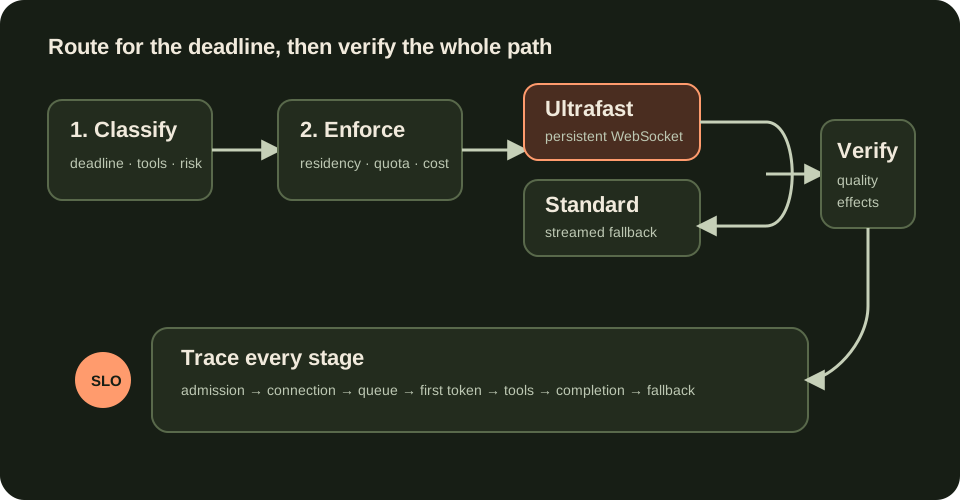
Put a latency policy in front of the model call. Classify requests by interaction mode, deadline, expected output size, tool depth, reversibility, residency requirement and value of a faster answer. Route only eligible work to Ultrafast. Keep Standard or a lower-cost model for background jobs, long-form generation with loose deadlines, simple classification and work whose critical path is dominated by external tools.
A practical policy can use three lanes: interactive-critical, interactive-normal and asynchronous. The first may receive Ultrafast when quota and residency allow it. The second uses Standard with streaming. The third uses ordinary or batch processing. Never let the model choose its own service tier or authority; the application owns the policy before the request reaches the model.
{
  "route": "interactive-critical",
  "model": "gpt-6-astra",
  "service_tier": "ultrafast",
  "deadline_ms": 4500,
  "residency": "us",
  "max_tool_calls": 3,
  "fallback": "standard"
}
This is an application policy object, not an OpenAI request schema. Keep authentication, authorization, tool scopes and approval rules identical across speed tiers. A latency fallback must not become a permission escalation.
Reuse one WebSocket across the agent loop
The Ultrafast documentation strongly recommends WebSockets for agentic applications with frequent tool calls. The official example opens one connection, sends multiple response.create events and carries state with previous_response_id. The WebSocket mode guide explains the persistent event stream used for incremental turns.
Connection reuse removes repeated handshakes and reduces round-trip overhead between model turns and tool results. Keep the socket lifecycle explicit: establish it near the interactive session, authenticate server-side, impose idle and absolute lifetimes, send heartbeats where the client library requires them, and reconnect with bounded backoff. Do not store business state only in the socket. Persist authoritative workflow state and idempotency keys outside the connection so recovery does not duplicate a side effect.
HTTP remains supported and may be simpler for one-shot requests. Use it when the workflow has a single bounded generation or when operational simplicity matters more than marginal latency. The architecture should earn a persistent connection through measured repeated-turn traffic, not fashion.
Remove the latency Ultrafast cannot fix
OpenAI's latency optimization guide groups improvements into faster processing, fewer output tokens, fewer input tokens, fewer requests, parallel work, better perceived progress and not defaulting to an LLM. Those principles still apply to a premium tier.
Shorten outputs with a product-specific schema. Combine sequential model steps when one structured response can safely do both. Parallelize independent retrieval or validation. Stream useful output as soon as it is safe to display. Use ordinary code, cached data or SQL for deterministic answers. Filtering irrelevant RAG context may help quality and cost, but input-token reduction often matters less to latency than eliminating a serial request or reducing generated tokens.
Measure tool time separately. If a search, ERP call or browser action consumes most of the deadline, improve or cache that dependency before buying faster inference. Ultrafast is best when generation is a material part of the critical path.
Design admission control around rate limits
The current guide publishes default Ultrafast token-per-minute limits of 500,000 for usage tiers 1–3, 1,000,000 for tier 4 and 5,000,000 for tier 5. These values can change, so load current limits from the provider documentation and account configuration rather than hard-coding an assumption into product promises.
Create an Ultrafast budget for each product or tenant. Estimate tokens before admission, reserve headroom for active sessions and reject or downgrade new premium work before the provider returns a burst of 429 errors. A queue is useful only when its wait remains inside the deadline; otherwise route to Standard or tell the caller that the premium path is temporarily unavailable.
Do not retry a rate-limited request blindly. Respect provider retry guidance, add jitter, cap attempts and preserve the original deadline. A retry that completes after the user has left is spend without value. Track admission decisions, rejected premium attempts, downgrade rate and tokens consumed per successful interactive task.
Enforce residency before speed
The Ultrafast guide states that the tier supports US data residency and global processing only, not EU or other non-US regional processing endpoints. Make residency an eligibility filter before latency and cost. If a tenant, dataset or contract requires an unsupported regional endpoint, the router must choose a compliant tier or decline the operation.
Do not infer residency from the user's interface language or IP address. Store it as an explicit policy attached to the tenant and data class. Propagate that policy through retrieval, tools, logs and model execution. A fast model call does not make the surrounding storage or tool chain compliant. Record the selected processing mode in the trace without logging sensitive prompt content.
Measure cost per successful deadline
Ultrafast costs more than Standard mode. Use the current OpenAI pricing page for rates, and calculate cost at the workflow boundary: uncached input, cached input, cache writes, output, external tools, retries and fallback. Divide total spend by tasks that meet the quality rubric and latency deadline.
Compare at least three variants on the same production-like task set: Standard with current architecture, Standard after removing avoidable round trips, and Ultrafast after the same optimizations. This prevents premium inference from receiving credit for improvements actually caused by WebSockets, streaming or shorter output. Report p50, p95 and p99; an average can hide queueing collapse.
A useful rollout metric is incremental cost per additional task completed inside the deadline. If Ultrafast cuts generation time but the product's completion rate does not move, the speed may not justify the premium. If a support operator completes materially more verified cases, the economics may be strong even when token cost rises.
Build a safe fallback state machine
Fallback should be explicit, observable and bounded. Before sending the request, downgrade when residency is unsupported, the Ultrafast budget is exhausted or the predicted request would exceed remaining quota. After dispatch, distinguish connection failure, rate limit, provider error and deadline expiration. Retry only when the operation is safe and the remaining time can still produce value.
For read-only generation, a single fallback to Standard may be acceptable. For tool-using agents, persist the completed tool effects and continue from known state; never replay the entire trajectory without idempotency. If a side effect already happened, switching service tiers must not repeat it. Keep the same model policy, tool allowlist and approval boundary on both paths.
Expose degraded mode to product telemetry and, when useful, to the user. Silent downgrade makes latency incidents impossible to explain. Silent upgrade makes cost incidents inevitable.
Best uses and cases to avoid
Strong candidates include interactive coding or analysis where generation dominates the wait, short multi-turn agent loops with several tool decisions, premium support interfaces with a measurable response deadline, and synchronous professional workflows where a few seconds change throughput. Use persistent connections and concise output contracts to preserve the benefit.
Avoid Ultrafast for asynchronous research, batch enrichment, long documents with no immediate reader, deterministic lookups and workflows dominated by slow external systems. Do not use it when residency rules require an unsupported region, when the request does not fit the rate-limit budget, or when Standard already meets the product SLO. A smaller model or ordinary program may be faster and cheaper for constrained work.
Roll out with evidence and a kill switch
Start with offline replay using de-identified traces. Then run shadow routing that records which requests would qualify without changing the tier. Enable a small cohort, preserve a Standard control group and keep output, reasoning and tool settings comparable. Define rollback thresholds for error rate, missed deadlines, 429 rate, fallback share, cost per success and task-quality regression.
Instrument route decision, residency decision, connection setup, queue time, first token, tool spans, completion, verification and fallback. Version the routing policy and prompt. Publish a dashboard that separates provider time from application time. The kill switch should disable Ultrafast without changing model permissions or tool behavior.
The production conclusion is narrow: Ultrafast is a latency lane, not a default model strategy. Use it when a measured user journey is constrained by model generation and the additional cost buys more successful work inside a deadline. Keep Standard as a tested path, maintain residency and admission controls, and optimize the entire system before treating token speed as product speed. Connect this architecture to GPT‑6.1 Sol model routing, MCP agent trajectory evaluation and user-journey SLOs.
Official references
These references document the tools discussed. Examples and design decisions are illustrative and should be adapted to the project and its versions.
Prepared by: Noor Yasser
Working through a similar engineering challenge?
I help teams turn architecture decisions into a clear scope and dependable, reviewable implementation.