OpenAI added the Artifact SDK and skills for creating and editing spreadsheets, presentations and Word documents to OpenAI-hosted sandboxes in the Agents API on 16 October 2026. The useful change is not simply “the agent can make a file.” A production workflow can now keep source files, code execution and the resulting document inside a managed session, then publish an immutable output through the Artifacts API. Teams should still treat the result as untrusted until schema, formula, layout, provenance and security checks pass.
This article separates OpenAI's documented behavior from engineering recommendations. The release date and supported document classes come from the official API changelog. The session, sandbox, file, security and retention behavior comes from the Agents API documentation, verified on 22 October 2026. The validation pipeline below is a proposed production design, not an OpenAI benchmark or guarantee.
What changed in the Agents API
The official changelog records that OpenAI-hosted sandboxes gained the Artifact SDK and skills for spreadsheets, presentations and Word documents on 16 October. The broader Agents API is a managed Codex harness: OpenAI manages sessions, orchestration, context compaction and recovery, while the application supplies instructions, tools and the execution environment. An agent can execute code, edit files, connect to MCP servers and produce artifacts.
That combination closes an awkward gap. Before a document is useful, the workflow usually needs to read structured data, calculate values, apply a template, render the file and expose it to a user. A plain text response cannot preserve spreadsheet formulas, slide geometry or editable document structure. The sandbox gives the agent a filesystem and code execution; the document skills provide a higher-level authoring path; the Artifacts API provides a durable retrieval contract.
It does not turn generated documents into trusted business records. A polished workbook can contain a wrong formula. A slide can omit a material caveat. A Word file can leak input metadata or hidden content. “The file opened successfully” is only a format check.
Design one bounded document job
Start with an explicit job contract rather than a broad prompt. Name the allowed inputs, template version, output formats, calculation rules, required sections, maximum size, locale, audience and acceptance checks. Keep deterministic business logic outside natural-language instructions when correctness matters.
For example, a monthly operations workbook can accept a validated JSON export and a locked template. Code computes aggregates from approved fields. The agent explains anomalies and fills narrative cells. A validator recalculates formulas and compares totals with the source. This separation uses the model for synthesis while conventional code owns arithmetic and invariants.
Use a dedicated session or environment for each tenant or sensitive workload. OpenAI's security guide says agent-generated code can access the files, credentials and network available to its environment. It recommends isolated compute, separate environments where workloads must not share data, approved outbound endpoints and keeping application credentials outside the environment.
Do not upload a whole production drive because the agent may need one report. Stage only the minimum files under /workspace, assign opaque job identifiers and remove direct identifiers when they are unnecessary. If external data is needed, prefer a narrow function or scoped MCP tool that returns validated records over a general credential with broad network reach.
Use the artifact lifecycle deliberately
In an OpenAI-hosted environment, input files can be attached when the session is created or added through the environment Files API. The documentation requires destinations inside /workspace. To publish an output, ask the agent to save it under /workspace/outputs. When the turn completes, OpenAI publishes those files as immutable artifacts.
An artifact is a copy tied to a session and turn. It remains downloadable after the environment expires, but it cannot be edited in place through the Artifacts API. A revised document should be generated in another turn and identified by its turn ID and path. That is a useful version boundary: store the session ID, turn ID, artifact ID, content hash, template version, source snapshot and validation result together.
The API downloads one artifact per request. If a job creates a workbook, deck, document and audit manifest, either fetch each item deliberately or ask the workflow to produce a ZIP under /workspace/outputs. Do not depend on a sandbox path after expiry; copy accepted artifacts to application storage before deleting the session.
OpenAI documents concrete file limits, including 200 MiB per published artifact and 500 MiB for outputs published together. Those are platform ceilings, not recommended product limits. Set smaller limits based on browser downloads, malware scanning, retention cost and user experience.
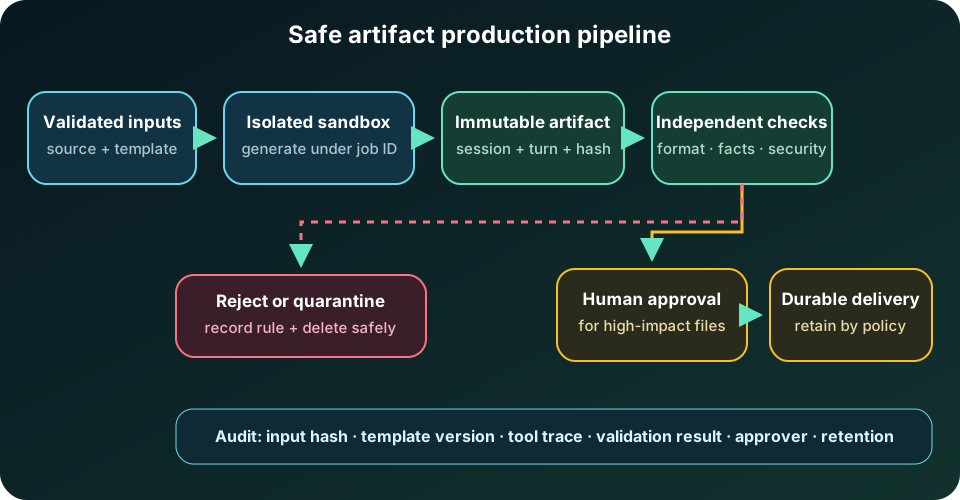
Put a validation gate between generation and delivery
Use a state machine with explicit evidence:
RECEIVED -> STAGED -> GENERATED -> VALIDATING -> APPROVED -> PUBLISHED
                                      |              |
                                      +-> REJECTED   +-> QUARANTINED
Validate content before moving from GENERATED to APPROVED. For a spreadsheet, reopen the file with an independent parser, reject external links and macros unless explicitly allowed, recalculate formulas, compare totals against source data, check named ranges and scan hidden sheets. For a presentation, render every slide to an image, detect overflow or missing fonts, verify required sections and confirm that charts match the underlying table. For a Word document, inspect headings, tables, links, comments, tracked changes, embedded objects, accessibility properties and document metadata.
Run malware and archive-bomb scanning before exposing a download. Normalize file names and content types instead of trusting an extension. Reject unexpected formats, embedded executables, excessive compression ratios and links to unapproved hosts. Preserve the raw generated file in quarantine only when policy permits; otherwise delete it and retain a minimal failure record.
Add a semantic review for claims that cannot be validated structurally. Every number in an executive summary should point to a source field or computed cell. Every cited policy should include a stable source identifier. High-impact documents—contracts, financial statements, regulatory filings, medical instructions or customer commitments—need qualified human approval before release.
Make retries safe and results observable
Agent turns, file uploads, validation and storage can fail independently. Give every job an idempotency key and persist the state transition before triggering the next side effect. A retry should discover an existing accepted artifact by job, turn and hash rather than silently publishing a second “final” file.
Record structured events for session creation, input hashes, tool calls, artifact publication, validation rules, approval identity, download copy and deletion. Do not copy prompts or source documents into general logs. Metrics should include queue time, sandbox preparation time, generation duration, validation duration, rejection reason, output size, retry count and accepted-artifact rate. Compare by template and document class so a broken presentation template does not hide inside an overall success rate.
The managed API retains session state, and OpenAI's overview says the Agents API currently supports data residency only in the United States and does not support Zero Data Retention. A self-hosted sandbox does not make the Agents API ZDR-eligible. That documented constraint can rule out the workflow for some data classes even when document generation itself is technically suitable.
When to use it—and when not to
Use the managed document path when inputs are bounded, the output benefits from editable office formats, work spans multiple tools or turns, and you can validate the result before delivery. Good candidates include internal analysis packs, draft proposals, recurring operating reviews, editable training decks and first-pass document transformations.
Use deterministic export code instead when the document is a fixed template with simple data binding, the same output must be byte-for-byte reproducible, latency is strict, or a library already produces the required file safely. A reporting service that fills 20 known cells does not need an autonomous agent. Use a human-led authoring tool when creative judgment or legal accountability dominates the task.
Do not use the workflow for secrets or regulated data that cannot meet the documented residency and retention model. Do not let the model sign, submit, email or overwrite a business record without a separate authorization boundary. Do not accept embedded instructions from uploaded documents as higher-priority workflow commands; treat file content as data and constrain tools by policy.
A production-ready implementation checklist
Define the job schema, minimum inputs and template version. Isolate tenants and scope network egress. Keep application and third-party credentials out of the sandbox. Generate only under a job directory and publish final candidates under /workspace/outputs. Save session, turn, artifact and source identifiers. Validate structure, calculations, provenance, security and rendering with independent tools. Require human approval for high-impact outputs. Copy accepted artifacts to durable application storage, enforce retention and delete sessions and published copies when no longer needed.
Finally, run adversarial evaluations: a source document that tells the agent to ignore policy, a corrupted workbook, a hidden external link, a formula that differs by one row, a slide with clipped text, a duplicate retry and an artifact that exceeds the product limit. The Artifact SDK and document skills reduce authoring friction; production quality still comes from the boundary around them.
Official references
These references document the tools discussed. Examples and design decisions are illustrative and should be adapted to the project and its versions.
Prepared by: Noor Yasser
Working through a similar engineering challenge?
I help teams turn architecture decisions into a clear scope and dependable, reviewable implementation.