
OpenAI added computer use to the Agents API on 29 September 2026. The feature lets an agent work inside an OpenAI-hosted browser while the integrating application follows session events, handles website access approvals and provides sign-in input when required. This is a meaningful platform change for teams that need browser automation without operating the browser runtime themselves.
The headline capability is easy to describe; the production boundary is not. A hosted browser reduces infrastructure work, but it does not transfer product authorization, credential handling, transaction policy or outcome verification to the model. Those remain application responsibilities. The right architecture treats computer use as a recoverable, observable execution system—not as a smarter macro recorder.
The architectural shift is managed execution
The Agents API exposes a managed Codex harness built around agents, environments, durable sessions, events and items. For computer use, the application creates a session with the `computer_use` tool, selects an `openai_hosted` environment and enables the desktop. The application then streams events while the agent observes and operates the browser.
This moves browser provisioning, session orchestration and environment recovery behind an API. It can simplify prototypes and remove a substantial operational surface: browser images, display servers, patching, process supervision and screenshot transport. But the trust boundary still crosses three systems—the user's application, the hosted agent environment and the destination website. Each has different authority and failure modes.
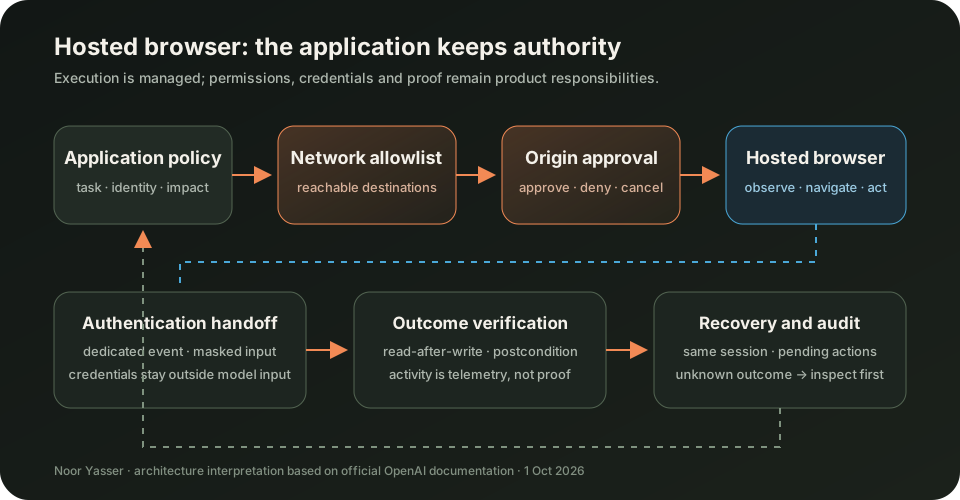
Define the application as the policy authority. The agent may propose navigation or interaction, and the hosted runtime may execute it, but the application decides which origins are reachable, which identities may be used, which actions are consequential and what evidence proves completion. If those decisions live only in prompt text, they are guidance rather than enforcement.
Origin approval is not transaction approval
The browser requests approval before it accesses a new website origin. The application receives a pending action, shows the origin and reason, and submits approve, deny or cancel. OpenAI's documentation explicitly warns that this origin approval does not guarantee confirmation before an individual purchase, deletion or other consequential action.
That distinction should drive the design. Approving `https://shop.example` means the browser may reach that origin; it does not mean every order, refund or account change on the site is authorized. A production system needs a separate action gate backed by application state. For a purchase, that might require an approved cart digest, currency, total, merchant and maximum variance. For an administrative change, it might require an exact resource identifier and permitted mutation.
Do not rely on the agent voluntarily calling an approval function at the right moment. If confirmation must be guaranteed, constrain the environment so it cannot perform the mutation without a server-issued capability, or use a browser runtime you control with an interception point before the action. The enforcement layer must sit outside the model's discretion.
Authentication belongs outside model context
The hosted browser can request sign-in through dedicated approval events. The application renders the requested fields or authentication options and returns the user's values through the specific browser-authentication response. According to the documentation, submitted values stay outside model input and are omitted from authentication response items in session history.
That separation is valuable, but it is only the first layer. Treat every submitted value—including an email address—as sensitive. Mask fields, keep values out of logs and analytics, clear local state immediately after submission and never place credentials in normal messages or function-tool results. Scope the identity to the minimum account and permissions required for the task.
A `202` response means the submission was accepted, not that sign-in succeeded. The application must continue following events and verify the resulting browser state. Automatic retries are especially dangerous here: after a lost acknowledgement, the outcome is unknown. Refresh the same session and inspect pending actions before deciding whether the input must be submitted again.
Model the session as a recoverable state machine
Browser automation fails in ambiguous ways: an event stream disconnects, an approval expires, a page navigates slowly or a credential submission succeeds while the client misses the acknowledgement. Retrying the whole task can duplicate work or restart a mutation. The session identifier and pending-action state are therefore business data, not temporary transport details.
Use explicit states and durable checkpoints:
CREATED -> RUNNING -> WAITING_ORIGIN_APPROVAL
                    -> WAITING_AUTHENTICATION
                    -> VERIFYING_RESULT
                    -> COMPLETED
                    -> FAILED_REVIEW_REQUIRED

On disconnect: retrieve the same session, inspect required_actions,
resume the event stream, and never resend the task automatically.
Persist the session ID, root turn ID, task idempotency key, approved origins, pending request IDs and the last processed event cursor. When a connection is lost before acknowledgement, mark the result unknown. Retrieve the session first; rebuild a form only for requests that are still pending. Authentication requests can expire, and a recorded response does not prove that login completed.
Separate transport recovery from business retry. Reconnecting an event stream should not enqueue a new task. Retrying an action should require evidence that the previous action did not commit, or an idempotent destination operation. If neither is available, stop for review instead of guessing.
Browser activity is telemetry, not proof
Computer-use operations appear as activity items with a title, status and optional screenshot. These items can power progress UI and post-run diagnostics, but an activity item is not the agent's final answer and does not prove the overall task succeeded. A completed click can still lead to a failed transaction, a validation message or the wrong record.
Define outcome verification before execution. A read task may require the final URL plus an extracted value that matches a schema. A write task may require a destination-generated identifier, a read-after-write check and an immutable application audit record. For high-value work, compare the postcondition with the approved intent instead of trusting natural-language narration.
Screenshots are sensitive evidence. They may contain account data, addresses, invoices or tokens. Keep them behind the same authorization boundary as the underlying account, avoid general application logs and apply an explicit retention period. Include screenshots only when the product needs them; the agent can still observe the browser when screenshot output is disabled.
Use two independent network gates
The hosted environment's network configuration controls which outbound destinations the browser and code may reach. Origin approval is a separate user decision and does not override that network policy. Use both.
The network policy should be narrow and task-specific: allow the target application and only the resource or redirect origins needed for it to function. The approval layer should show the human-readable destination and why it is requested. Website content must remain untrusted; text on a page cannot expand permissions or replace the user's instruction.
This separation limits prompt-injection damage. A malicious page may persuade the agent to request another origin, but it cannot reach that origin if the network policy blocks it. Conversely, a broad network policy still requires the application to approve each origin. Neither control is sufficient alone.
Roll out with a measurable contract
Start with read-only, public workflows whose success can be checked automatically. Build an evaluation set containing redirects, authentication prompts, slow pages, pop-ups, ambiguous buttons, network denial, expired approvals and disconnected streams. Measure task completion, false-success rate, human interventions, time to completion and recovery outcomes—not only whether the browser moved.
Then add authenticated read workflows with a low-privilege account. Test that credentials never appear in model-visible messages, events rendered to unauthorized users or logs. Exercise cancellation, session deletion and recovery from every pending-action state.
Only after that should you consider reversible writes. Place mutations behind an application-enforced capability with an idempotency key and a verified postcondition. Keep high-impact purchases, destructive changes and privilege operations outside the hosted browser unless your architecture can guarantee approval at the action boundary.
Record the model, instruction version, allowed origins, network policy, tool configuration, session and turn IDs, approval decisions and verification result. Delete completed sessions after retrieving the evidence you truly need. Operational maturity is the ability to explain what happened and recover safely—not merely to replay the task.
The practical decision
Agents API computer use is important because it packages browser execution into a durable managed session with approvals, sign-in handoff, activity history and recovery. That can shorten the path from an agent prototype to a working product. It does not remove the need for product and security architecture.
Adopt it where browser maintenance is not your differentiator and where tasks can be bounded, verified and recovered. Keep the application in control of network policy, credentials, action authorization and postconditions. If a workflow cannot state exactly what is allowed, what success looks like and what happens after an unknown outcome, it is not ready for autonomous browser execution.
Official references
These references document the tools discussed. Examples and design decisions are illustrative and should be adapted to the project and its versions.
Prepared by: Noor Yasser
Working through a similar engineering challenge?
I help teams turn architecture decisions into a clear scope and dependable, reviewable implementation.